Retail Order Guide
Order Guide for Retail
Wolt's order integration for retailers, meaning all merchants besides restaurants, makes use of webhook notifications to inform you when the order is in its final state. Retail orders can have substitutions or missing items, making it important to pull the order details in once the order has been picked and marked as complete. The picking process is done via Wolt's "Merchant App", you can receive access to a test version to mimic the real flow.
The integration begins either when the order is marked READY (recommended) or DELIVERED. There is only one API call expected.
Retail Order Flow Overview
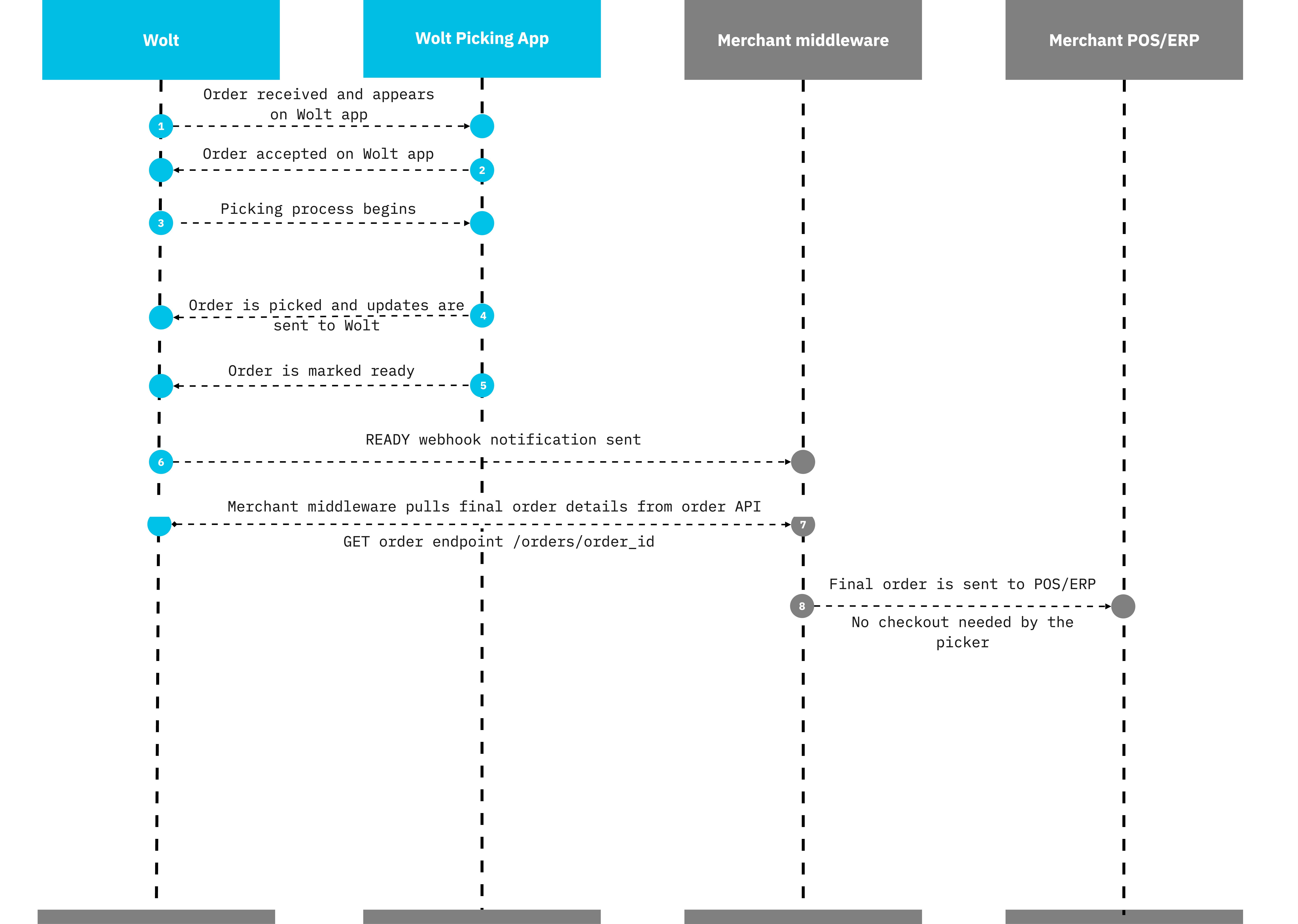
Getting Final Order Details
Use the information in the webhook notification or order Submitter to pull the final order details in.
Notification examples
Order Ready
Triggered after venue staff completes order collection and marks the order as ready for pickup.
payload example
{"id": "90f5c25cbbfb3d131a46e643","type": "order.notification","order": {"id": "90f5be47fc97e11107f8a480","venue_id": "9a5c7e3102fe6a000c4b562b","status": "READY","resource_url": "https://pos-integration-service.wolt.com/orders/90f5be47fc97e11107f8a480"},"created_at": "2021-07-19T18:20:12.378509Z"}
Order Delivered
Sent when the courier marks the order as delivered. The order is now in its final state.
payload example
{"id": "90f5c25cbbfb3d131a46e643","type": "order.notification","order": {"id": "90f5be47fc97e11107f8a480","venue_id": "9a5c7e3102fe6a000c4b562b","status": "DELIVERED","resource_url": "https://pos-integration-service.wolt.com/orders/90f5be47fc97e11107f8a480"},"created_at": "2021-07-19T18:20:12.378509Z"}
Important Notes
Order modifications (substitutions, missing items) are reflected in the API response when you pull order details after the
READYstatus.Treat webhook notifications as triggers and always pull full order data before processing internally.
Ensure your system handles out-of-order events, retries, order cancelations, and validates against duplicate processing.
Receiving Whole Order Payloads to your Webhook URL
Similarly to the option of receiving webhook notifications, to be followed by a GET order call, it is possible to get the whole order payload as a webhook notification (POST) to your webhook URL.
This can be set using the Order Submitter App on our developer portal, or by requesting this from your Wolt contact.
Status triggers:
| Status Type | Description |
| "CREATED" | Sent for all new orders which the merchant is receiving on the Wolt marketplace. |
| "PRODUCTION" | Sent once the order has been accepted or confirmed* by the venue staff, either automatically or manually. *pre-orders should be confirmed upon creation, Wolt will move them automatically in "PRODUCTION" status when it's time to start the food preparation or order collection. |
| "READY" | Sent once the merchant has completed the preparation or collection of the order. |
| "CANCELED" | Sent once the order has been “rejected”, either by the merchant, the customer or Wolt Support. |
| "COURIER ARRIVAL" *optional | Sent X* min before the courier's arrival at the merchant's location. *X is configurable per location. |
| "DELIVERED" | Sent once the order is delivered to the customer. |
Example payload
As Wolt runs two versions of the order payload, please make sure you develop towards usage of Order API v2 - this is the most recent and most comprehensive payload.
The Order content should be then mapped to your format and used to your needs (eg in the KDS, POS, ERP etc).
Webhook server security
Please provide a client secret that is cryptographically random and at least 128 bits in length. This will be used to sign the webhook body using HMAC-SHA256.
Wolt signs the request by generating a signature from the request body, using the client secret, and sending it alongside the request.
Authentication
Supported methods:
oAuth
Signature using a client secret
Static token
Wolt signature specification
Notifications are signed with HMAC-SHA256.
String format for the signature is HEX.
The signature is placed to the WOLT-SIGNATURE HTTP request header.
The secret key for generating the signature from the request body is the client secret
Wolt signature example
Client secret: example-hmac-sha256-wolt
To generate the signature of the body, use HMAC-SHA256 with the client secret provided to Wolt. Generate it from the request body (i.e. the notification), and compare it to the value in the wolt-signature header.
Expected response
We require a 200 response to acknowledge our notification was received correctly. Otherwise, the notification will fall back into the retry logic.
Retry logic
We will submit the first retry after 5 seconds, followed by two additional retries at 5-second intervals.